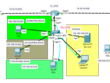
Pada pembahasan kali ini saya ingin membahas atau ngoprek router cisco mengenai load balancing menggunakan HSRP (Host Stanby Router Protocol) tujuanya sama dengan GLBP yang akan kita bahas next topik ya, jadi HSRP sebuah protokol standar CISCO yang menetapkan sebuah router yang secara otomatis mengambil alih jika router yang lain gagal. Dalam HSRP disetting dua status router yaitu aktif dan standby. Router standby baru digunakan jika router aktifnya gagal, kurang lebih pengertiaanya seperti itu lengkapnya baca di mbah google saja. disini saya menggunakan routing eigrp kalian bisa juga menggunakan ospf

|
1 2 3 4 5 6 7 8 9 10 11 12 13 14 15 16 17 18 19 20 21 22 23 24 25 26 27 28 29 30 31 32 33 34 35 36 37 38 39 40 41 42 43 44 45 46 47 48 49 50 51 52 53 54 55 56 57 58 59 60 61 62 63 64 65 66 67 68 69 70 71 72 73 74 75 76 77 78 79 80 81 82 83 84 85 86 87 88 89 90 91 92 93 94 95 96 97 98 99 |
untuk ip 10.0.3.250 adalah gateway virtual yang akan kita gunakan untuk gateway HSRP #R1 R1#configure terminal R1(config)#interface fastEthernet 0/0 R1(config-if)#ip address dhcp R1(config-if)#full-duplex R1(config-if)#speed 100 R1(config-if)#no shutdown R1(config-if)#description INTERNET R1(config-if)#end R1# R1#configure terminal Enter configuration commands, one per line. End with CNTL/Z. R1(config)#ip route 0.0.0.0 0.0.0.0 192.168.122.1 R1(config)#end R1#configure terminal Enter configuration commands, one per line. End with CNTL/Z. R1(config)#ip dns server R1(config)#ip domain-lookup R1(config)#ip name-server 8.8.8.8 R1(config)#end R1#configure terminal Enter configuration commands, one per line. End with CNTL/Z. R1(config)#interface fastEthernet 1/0 R1(config-if)#ip address 10.0.1.1 255.255.255.252 R1(config-if)#no shutdown R1(config-if)#int fa2/0 R1(config-if)#ip address 10.0.2.1 255.255.255.252 R1(config-if)#no shut R1(config-if)#exit R1(config)#int lo 0 R1(config-if)#ip address 1.1.1.1 255.255.255.255 R1(config)#router eigrp 10 R1(config-router)#network 0.0.0.0 R1(config-router)#no auto-summary R1(config-router)#end R1# R1#wr #Konfigurasi R2 R2#configure terminal Enter configuration commands, one per line. End with CNTL/Z. R2(config)#interface fastEthernet 0/0 R2(config-if)#ip address 10.0.1.2 255.255.255.252 R2(config-if)#no shutdown R2(config-if)#int fa1/0 R2(config-if)#ip address 10.0.3.1 255.255.255.0 R2(config-if)#no shutdown R2(config)#router eigrp 10 R2(config-router)#network 10.0.1.0 R2(config-router)#network 10.0.3.0 R2(config-router)#passive-interface fastEthernet 1/0 R2(config-router)#no auto-summary R2(config)#do wr R2(config)#interface fastEthernet 1/0 #langsung kita konfigurasi HSRP nya R2(config-if)#standby 1 ip 10.0.3.250 R2(config-if)#standby 1 preempt R2(config-if)#end #Konfigurasi R3 3#configure terminal Enter configuration commands, one per line. End with CNTL/Z. R3(config)#interface fastEthernet 0/0 R3(config-if)#ip address 10.0.2.2 255.255.255.252 R3(config-if)#no shutdown R3(config-if)#int fa 1/0 R3(config-if)#ip address 10.0.3.2 255.255.255.0 R3(config-if)#no shutdown R3(config-if)#exit R3(config)#router eigrp 10 R3(config-router)#network 10.0.2.0 R3(config-router)#network 10.0.3.0 R3(config-router)#passive-interface fastEthernet 1/0 R3(config-router)#no auto-summary R3(config-router)#exit #kita lewatkan router 3 karena priority lebih tinggi yaitu 105 yang secara default yaitu 100 R3(config)#interface fastEthernet 1/0 R3(config-if)#standby 1 ip 10.0.3.250 R3(config-if)#standby 1 preempt R3(config-if)#standby 1 priority 105 |