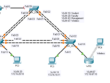
Kembali lagi dengan topologi cisco yang kedua,lebih ke routing and switching layer 2 dan 3, bisa dilihat pada gambar di atas dan pengalamatan ip detailnya sudah tercantum, bagaimana agar semua router terhubung dengan routing rip v2, dan beberapa vlan, langsung ke pembahasan saja.
|
1 2 3 4 5 6 7 8 9 10 11 12 13 14 15 16 17 18 19 20 21 22 23 24 25 26 27 28 29 30 31 32 33 34 35 36 37 38 39 40 41 42 43 44 45 46 47 48 49 50 51 52 53 54 55 56 57 58 59 60 61 62 |
#ROUTER CORE Router>en Router#configure terminal Enter configuration commands, one per line. End with CNTL/Z. Router(config)#hostname R_CORE R_CORE(config)#enable secret putra123 R_CORE(config)#line console 0 R_CORE(config-line)#password 12345 R_CORE(config-line)#login R_CORE(config-line)#exit R_CORE(config)#line vty 0 4 R_CORE(config-line)#password 123456 R_CORE(config-line)#exit R_CORE(config)#service password-encryption R_CORE(config)#banner motd #Welcome to Router Core# R_CORE(config)#interface gigabitEthernet0/0 R_CORE(config-if)#description Ip Address G0/0 R_CORE(config-if)#ip address 10.10.10.2 255.255.255.252 R_CORE(config-if)#no shutdown R_CORE(config)#interface gigabitEtherne0/2 R_CORE(config-if)#description Ip Address G0/2 R_CORE(config-if)#ip address 10.10.10.5 255.255.255.252 R_CORE(config-if)#no shutdown R_CORE(config-if)# %LINK-5-CHANGED: Interface GigabitEthernet0/0, changed state to up %LINEPROTO-5-UPDOWN: Line protocol on Interface GigabitEthernet0/0, changed state to up R_CORE(config-if)#exit R_CORE(config)#interface gigabitEthernet0/1.10 R_CORE(config-subif)#encapsulation dot1Q 10 R_CORE(config-subif)#ip address 192.168.20.1 255.255.255.0 R_CORE(config)#interface gigabitEthernet0/1.20 R_CORE(config-subif)#encapsulation dot1Q 20 R_CORE(config-subif)#ip address 192.168.30.1 255.255.255.0 R_CORE(config-subif)#exit R_CORE(config)#interface gigabitEthernet0/1.30 R_CORE(config-subif)#encapsulation dot1Q 30 R_CORE(config-subif)#ip address 192.168.40.1 255.255.255.0 R_CORE(config-subif)#exit R_CORE(config)#interface gigabitEthernet0/1.40 R_CORE(config-subif)#encapsulation dot1Q 40 R_CORE(config-subif)#ip address 100.100.100.1 255.255.255.248 R_CORE(config-subif)#exit R_CORE(config)#interface gigabitEthernet0/1 R_CORE(config-if)#no shutdown |
|
1 2 3 4 5 6 7 8 9 10 11 12 13 14 15 16 17 18 19 20 21 22 23 24 25 26 27 28 29 30 31 32 33 34 35 36 37 38 39 40 41 42 43 44 45 46 47 48 49 50 51 52 53 54 55 56 |
#Setting R_BLOK_1 R-Hasibuan>enable R-Hasibuan#configure terminal Enter configuration commands, one per line. End with CNTL/Z. R-Hasibuan(config)#hostname R_BLOK_1 R_BLOK_1(config)#enable secret putra123 R_BLOK_1(config)#line console 0 R_BLOK_1(config-line)#password 12345 R_BLOK_1(config-line)#login R_BLOK_1(config-line)#exit R_BLOK_1(config)#service password-encryption R_BLOK_1(config)#ip domain-name putrarude.com R_BLOK_1(config)#username root password put123 R_BLOK_1(config)#line vty 0 4 R_BLOK_1(config-line)#transport input all R_BLOK_1(config-line)#login local R_BLOK_1(config-line)#exit R_BLOK_1(config)#crypto key generate rsa The name for the keys will be: R_BLOK_1.putrarude.com Choose the size of the key modulus in the range of 360 to 2048 for your General Purpose Keys. Choosing a key modulus greater than 512 may take a few minutes. How many bits in the modulus [512]: 1024 % Generating 1024 bit RSA keys, keys will be non-exportable...[OK] R_BLOK_1(config)#banner motd #Welcome R_BLOK_1# *Mar 1 0:17:49.207: %SSH-5-ENABLED: SSH 1.99 has been enabled R_BLOK_1(config)#interface gigabitEthernet0/1 R_BLOK_1(config-if)#description ? LINE Up to 240 characters describing this interface R_BLOK_1(config-if)#description Ip Address G0/0 R_BLOK_1(config-if)#ip address 10.10.10.1 255.255.255.252 R_BLOK_1(config-if)#no shutdown %LINK-5-CHANGED: Interface GigabitEthernet0/1, changed state to up R_BLOK_1(config-if)#exit R_BLOK_1(config)#interface gigabitEthernet0/0 R_BLOK_1(config-if)#description Ip Address G0/0 R_BLOK_1(config-if)#ip address 192.168.10.1 255.255.255.0 R_BLOK_1(config-if)#no shutdown %LINK-5-CHANGED: Interface GigabitEthernet0/0, changed state to up %LINEPROTO-5-UPDOWN: Line protocol on Interface GigabitEthernet0/0, changed state to up R_BLOK_1(config-if)# |
|
1 2 3 4 5 6 7 8 9 10 11 12 13 14 15 16 17 18 19 20 21 22 23 24 25 26 27 28 29 30 31 32 33 34 35 36 37 38 39 40 41 42 43 44 45 46 47 48 49 |
#Setting R_Blok_2 Router>en Router#configure terminal Enter configuration commands, one per line. End with CNTL/Z. Router(config)#hostname R-BLOK_2 R-BLOK_2(config)#enable secret putra123 R-BLOK_2(config)#line console R-BLOK_2(config-line)#password 12345 R-BLOK_2(config-line)#login local R-BLOK_2(config-line)#line vty 0 4 R-BLOK_2(config-line)#password 123456 R-BLOK_2(config-line)#login local R-BLOK_2(config-line)#exit R-BLOK_2(config)#service password-encryption R-BLOK_2(config)#banner motd #Welcome to Router Blok 2# R-BLOK_2(config)#interface gigabitEthernet 0/0 R-BLOK_2(config-if)#description Ip Address G0/0 R-BLOK_2(config-if)#ip address 10.10.10.6 255.255.255.252 R-BLOK_2(config-if)#no shutdown %LINK-5-CHANGED: Interface GigabitEthernet0/0, changed state to up %LINEPROTO-5-UPDOWN: Line protocol on Interface GigabitEthernet0/0, changed state to up R-BLOK_2(config-if)#exit R-BLOK_2(config)#interface gigabitEthernet 0/1 R-BLOK_2(config-if)#description Ip Address g0/1 R-BLOK_2(config-if)#ip address 192.168.50.1 255.255.255.128 R-BLOK_2(config-if)#no shutdown %LINK-5-CHANGED: Interface GigabitEthernet0/1, changed state to up %LINEPROTO-5-UPDOWN: Line protocol on Interface GigabitEthernet0/1, changed state to up exit R-BLOK_2(config)# |
|
1 2 3 4 5 6 7 8 9 10 11 12 13 14 15 16 17 18 19 20 21 22 23 24 25 26 27 28 29 30 31 32 33 34 35 36 37 38 39 40 41 42 43 44 45 46 47 48 49 50 51 52 53 54 55 56 57 58 59 60 61 62 63 64 65 66 |
#ROUTING RIP V2 Routing R-BLOK1 Welcome R_BLOK_1 User Access Verification Password: R_BLOK_1>en Password: R_BLOK_1#configure terminal Enter configuration commands, one per line. End with CNTL/Z. R_BLOK_1(config)#router rip R_BLOK_1(config-router)#ver R_BLOK_1(config-router)#version 2 R_BLOK_1(config-router)#network 192.168.10.0 R_BLOK_1(config-router)#network 10.10.10.0 R_BLOK_1(config-router)#no auto-summary R_BLOK_1(config-router)#exit R_BLOK_1(config)# R_CORE Welcome to Router Core User Access Verification Password: R_CORE>en Password: R_CORE#configure terminal Enter configuration commands, one per line. End with CNTL/Z. R_CORE(config)#router rip R_CORE(config-router)#version 2 R_CORE(config-router)#network 10.10.10.0 R_CORE(config-router)#network 10.10.10.4 R_CORE(config-router)#no auto-summary R_CORE(config-router)#exit R_CORE(config)# R-BLOK_2 R-BLOK_2(config)#router rip R-BLOK_2(config-router)#version 2 R-BLOK_2(config-router)#network 192.168.50.0 R-BLOK_2(config-router)#network 10.10.10.0 R-BLOK_2(config-router)#no auto-summary R-BLOK_2(config-router)#exit R-BLOK_2(config)# R_CORE R_CORE(config)#router rip R_CORE(config-router)#network 100.0.0.0 R_CORE(config-router)#network 192.168.20.0 R_CORE(config-router)#network 192.168.30.0 R_CORE(config-router)#network 192.168.40.0 R_CORE(config-router)#no auto-summary R_CORE(config-router)#exit R_CORE(config)# |