Pada pembahasan kali ini saya akan membahas tentang link anggregat atau LAG di juniper SRX, case kali ini saya menggabungkan dengan cisco layer 3, kalian bisa combine dengan switch L2/L3 lainnya. jadi LAG ini terdapat 2 opsi, dapat berjalan di Layer 2/Layer 3, Layer 2 main di Vlan karena basenya Mac Address, sedangkan Layer 3 basenya IP, Lengkapnya bisa explore di google ya seperti LACP dll.
|
1 2 3 4 5 6 7 8 9 10 11 12 13 14 15 16 17 18 19 20 21 22 23 24 25 26 |
#Pertama kita setting Juniper SRX, aktifkan Chasiss LAG nya lalu kita set sebagai LACP Active root#set chassis aggregated-devices ethernet device-count 2 root#set interfaces ge-0/0/1 gigether-options 802.3ad ae0 root#set interfaces ge-0/0/2 gigether-options 802.3ad ae0 root#set interfaces ae0 aggregated-ether-options lacp active root#set interfaces ae0 unit 0 family inet address 172.16.1.1/24 #Setting Zones root#edit security zones security-zone trust [edit security zones security-zone trust] root# set host-inbound-traffic system-services all [edit security zones security-zone trust] root# set host-inbound-traffic protocols all #Karena kita main interface trafic sementara di buka semua [edit security zones security-zone trust] root# set interfaces ae0 host-inbound-traffic system-services all [edit security zones security-zone trust] root# set interfaces ae0 host-inbound-traffic protocols all |
Setting Port Chanell di cisco Layer 3
|
1 2 3 4 5 6 7 8 9 10 11 12 13 |
Switch#configure terminal Switch(config)#interface range gigabitEthernet 0/0-1 Switch(config-if-range)#no swichport Switch(config-if-range)#no ipaddress Switch(config-if-range)#channel-group 1 mode active Switch(config)#interface port-channel 1 Switch(config-if)#ip address 172.16.1.2 255.255.255.0 Switch(config-if)#no swichport Switch(config-if)#no sh |
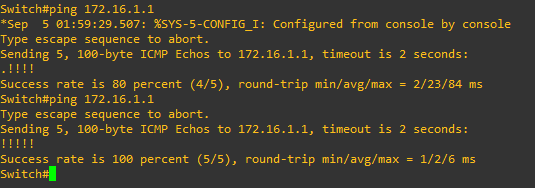
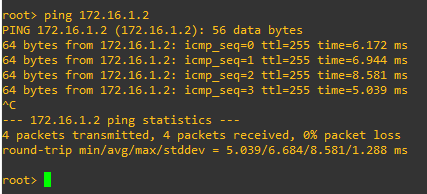
Dari sini kita harusnya sudah dapat terhubung ke Juniper SRX dan jika di tes link down 1, maka masih tetap terhubung, tetapi switch belum dapat akses internet untuk akses internet, harus membuat rule nat, routing di srx
|
1 2 3 4 5 6 7 8 9 10 11 12 13 14 15 16 17 18 19 20 21 22 23 24 25 26 27 28 29 30 |
#Setting DNS dan IP internet set system name-server 8.8.8.8 set interfaces ge-0/0/5 unit 0 family inet address 10.10.55.236/24 set interfaces ge-0/0/6 unit 0 family inet address 10.10.100.239/24 #Setting Zone Untrust set security zones security-zone untrust screen untrust-screen set security zones security-zone untrust host-inbound-traffic system-services all set security zones security-zone untrust host-inbound-traffic protocols all set security zones security-zone untrust interfaces ge-0/0/5.0 set security zones security-zone untrust interfaces ge-0/0/6.0 #Setting Nat & Policy set security nat source rule-set Lan-to-inet from zone trust set security nat source rule-set Lan-to-inet to zone untrust set security nat source rule-set Lan-to-inet rule lan-to-inet match source-address 0.0.0.0/0 set security nat source rule-set Lan-to-inet rule lan-to-inet match destination-address 0.0.0.0/0 set security nat source rule-set Lan-to-inet rule lan-to-inet then source-nat interface set security policies from-zone trust to-zone trust policy default-permit match source-address any set security policies from-zone trust to-zone trust policy default-permit match destination-address any set security policies from-zone trust to-zone trust policy default-permit match application any set security policies from-zone trust to-zone trust policy default-permit then permit set security policies from-zone trust to-zone untrust policy default-permit match source-address any set security policies from-zone trust to-zone untrust policy default-permit match destination-address any set security policies from-zone trust to-zone untrust policy default-permit match application any set security policies from-zone trust to-zone untrust policy default-permit then permit #Static Route set routing-options static route 0.0.0.0/0 next-hop 10.10.100.254 set routing-options static route 0.0.0.0/0 next-hop 10.10.55.254 |